GPU Server Blibs
GPU Server Blibs are fully root servers on high-end tuned up-cycled hardware with 100% Bare Metal Performance on GPU, RAM and CPU Cores. Storage and network connectivity are managed through our high-performance VPS solutions.
Please read first if you dont have: Trooper.AI (Service Introduction)
Alle servers are provisioned and managed through the official management interface at:
https://www.trooper.ai/manage or via GPU Server API (RESTful)
Our User Interface provides full control over GPU servers, including creation, monitoring, secure access, firewall rules, template management, migration and lifecycle actions. Read full docs here.
🚨 UFW ATTENTION: You do not need a local “Ubuntu FireWall” (UFW) activated on your GPU Server Blib! Read more here: 🛡️ Trooper.AI customizable Network-Level Firewall
Don’t have a GPU Blib now? 👉
1. Access and Overview

After logging in at https://james.trooper.ai/manage , users are presented with a list of active and frozen Blibs. Each server entry includes the following information:
- Blib name and status (
running,stopped,frozen), read more: Blibs Status List - GPU configuration (e.g. 1× RTX 3090, 2× A100)
- CPU and memory (e.g. 12 cores, 86 GB RAM)
- NVMe SSD capacity
- Assigned hostname (e.g.
connect01.trooper.ai) - Allocated public port range (TCP, optional UDP)
- Installed software Templates (e.g. Jupyter Notebook, ComfyUI Template for GPU Server Blibs)
- Secure HTTPS access, read more: 🌍 HTTPS Access (How to access your Blib via SSL)
- GPU Drivers
- Backups and Snapshots
- 🛡️ Trooper.AI customizable Network-Level Firewall
- VNC Emergency Console
- Use SSH Keys, Fail2Ban and Connection Insights easily via: Security Tools by Trooper.AI
System temperature and billing periods are also shown where applicable.
2. Creating and Starting a Server
To deploy a new GPU Server Blib:
- Navigate to the Order GPU Server section or use the Create New Server function in the dashboard.
- Select the desired server configuration (e.g.
sparbox.m1,infinityai.m2). - Optionally, choose one or more templates to be pre-installed:
- Confirm the selection and accept the terms.
- Start the server.
Provisioning usually takes 1-5 minutes, depending on the server you choose. After that, the system will install drivers and monitoring tools, which can take another 2-10 minutes depending on external APT mirror speed. You can expect one automatic restart during this process as the GPU drivers are set up.
🚫 Server Management Software: Do not install a server management software like Dokploy, CapRover, Plesk, etc. This will not work on a GPU server. These kind of tools are only made for your Web Servers!
🚫 Blackwell Driver Downgrades: As per our terms of service, do not modify the drivers for Blackwell cards (50xx, RTX Pro xx00) on your machine BELOW version 580-server-open. Doing a driver downgrade may cause system instability and potential service interruption. Your server will remain stopped until the issue is resolved. No refund. CUDA’s backwards compatibility eliminates the need for older driver versions.
Current prices of our GPU servers:
| Blib Name | GPU | CPU RAM | Cores | NVMe | Price | +15% Promo Price** |
|---|---|---|---|---|---|---|
| Explorer | 1–6× RTX A4000 16 GB | 20–312 GB | 4–24 | 180–1200 GB | €0.18/h or €97/m | |
| Novadrive | 1–4× Tesla V100 16 GB | 28–164 GB | 4–20 | 180–1200 GB | €0.19/h or €103/m | |
| Conqueror | 1–4× RTX 4070 Ti Super 16 GB | 32–220 GB | 4–20 | 180–1200 GB | €0.23/h or €122/m | |
| Novatesla | 1–8× Tesla V100 32 GB | 24–272 GB | 6–70 | 180–1200 GB | €0.24/h or €130/m | |
| Sparbox | 1–4× RTX 3090 24 GB | 26–176 GB | 2–30 | 180–1200 GB | €0.30/h or €158/m | |
| Ranger | 1–3× RTX Pro 4000 Blackwell 24 GB | 32–192 GB | 5–48 | 180–1200 GB | €0.37/h or €202/m | |
| Paladin | 1–4× RTX 4080 Super 32 GB | 28–192 GB | 4–42 | 180–1200 GB | €0.47/h or €252/m | |
| Infinityai | 1–8× A100 40 GB | 32–640 GB | 8–156 | 180–1200 GB | €0.53/h or €285/m | |
| Powerai | 1–5× RTX 4090 24 GB | 36–292 GB | 4–82 | 180–1200 GB | €0.55/h or €296/m | |
| Templar | 1–2× RTX Pro 4500 Blackwell 32 GB | 44–144 GB | 8–60 | 180–1200 GB | €0.62/h or €332/m | |
| Stellarai | 1–4× RTX 4090 48 GB | 72–376 GB | 10–192 | 180–1200 GB | €0.82/h or €440/m | |
| Darkrock | 1× RTX 5090 32 GB | 42–86 GB | 4–12 | 180–900 GB | €0.98/h or €530/m | |
| Rabenai | 1–2× RTX Pro 5000 Blackwell 48 GB | 40–176 GB | 14–64 | 180–1200 GB | €1.13/h or €609/m | |
| Hyperionai | 1–4× RTX Pro 6000 Blackwell 96 GB | 80–564 GB | 14–94 | 180–1200 GB | €1.68/h or €906/m |
** Promotional pricing reflects the maximum discount available through prepaid budget options. Currently +15% Extra Credits! See the “Add Budget” function for details.
3. Stopping, Freezing, Resetting and Terminating GPU Server Blibs
Trooper.AI (Service Introduction) provides flexible lifecycle options for each Blib:
Productive states:
- Start: Starts the server.
- Stop: Halts the server. Resources (GPUs, CPU Cores, RAM) remain allocated, and the instance can be restarted within seconds.
Optional states:
- Freeze: The server is archived and resource allocation is released. Startup time may vary and reassignment of ports may be required. Consider using the stopped state if predictable startup times are needed! FREEZING IS NOT RECOMMENDED FOR ENTERPRISE CLIENTS DUE TO PORT CHANGES AND LONGER TIMES ON INACCESSIBILITY!
- Reset: Deletes all data on the server and reinstalls the initial configuration. Ports may change. CPU model and speed may change. Your pricing stays. ALL DATA WILL BE LOST! This action cannot be undone.
- Terminate: Permanently deletes the server and all associated data. This action cannot be undone.
Read more: Blibs Status List
All lifecycle actions are accessible via the context menu in the dashboard.
4. Template Management
Software templates can be selected during server creation or installed afterwards. Templates automatically install dependencies, configure services, and open required ports.
Common templates include:
- Jupyter Notebook
- OpenWebUI & Ollama
- ComfyUI Template for GPU Server Blibs
- Ubuntu Desktop and RDP Access
- Framepack
- Any Docker
- … and many more Templates
Multiple templates can be combined as needed on one server blib.
5. Public Network Access
Each Blib is assigned a dedicated range of public TCP ports (typically 10–40 open 1:1 NAT ports). These are accessible via the assigned hostname (e.g. connectXX.trooper.ai) and are displayed in the dashboard.
Connection Limits (Outbound):
To ensure platform stability and prevent abuse or misconfigured workloads from generating excessive external traffic, all Blibs are subject to per-machine outbound rate limits and connection tracking limits. This includes:
- Maximum number of concurrent outbound connections (2048 per GPU)
- TCP SYN rate limiting (new outbound connections)
- UDP packet rate limiting (NEW state)
- ICMP rate limiting
If your machine exceeds these thresholds, additional outbound traffic may be temporarily dropped or rejected by the routing layer.
Timeout Handling:
For security reasons, long-lived connections may be periodically closed by our routing system. We recommend implementing robust reconnection and timeout handling within your software to ensure continued operation.
UDP Traffic (Optional):
UDP traffic is not enabled by default. You can enable UDP access for your Blib via the Firewall Rules if required. Please ensure your application is designed to safely handle UDP exposure.
For detailed information on accessing your Blib, please refer to the following documentation:
- SSH Access (incl. File Transfer)
- RDP Access
- optional: Realtime Access with NoMachine
- 🌍 HTTPS Access (How to access your Blib via SSL)
- About SSL Certificates
- 🛡️ Trooper.AI customizable Network-Level Firewall
6. Monitoring and System Information
The management interface provides the following real-time monitoring features:
- CPU and GPU temperature display
- Network traffic information
- Resource utilization (CPU, RAM, GPU)
- Template status and version
- Uptime and lifecycle state
7. Behavior on Insufficient Credit
Blibs operate on a prepaid credit system. If the prepaid balance is depleted:
- The server is automatically stopped and may be frozen.
- If the balance is not replenished within 72 hours, the server and all associated data may be permanently deleted.
Note: Servers will not accrue charges without available credit. However, GPU resources are not guaranteed unless the balance is sufficient.
8. Contract Models and Resource Use
- All GPU servers include 5 TB of monthly traffic per GPU. For example, a 2-GPU server includes 10 TB.
- If usage exceeds this soft limit, bandwidth may be throttled or additional charges applied.
- Discounts are available for weekly, monthly, and annual contracts.
- Yearly contracts and business invoicing options are available upon request.
9. Data Protection and Compliance
- All servers are hosted within the European Union (Germany, Netherlands, France).
- GDPR-compliant processing is ensured.
- A Data Processing Agreement (DPA) and/or Non-Disclosure Agreement (NDA) is available on monthly plans with a few clicks.
10. Support
For technical issues or custom provisioning requests, please contact:
- Email: [email protected]
- WhatsApp: +49 6126 9289991
11. Migration / Upgrade of Blibs
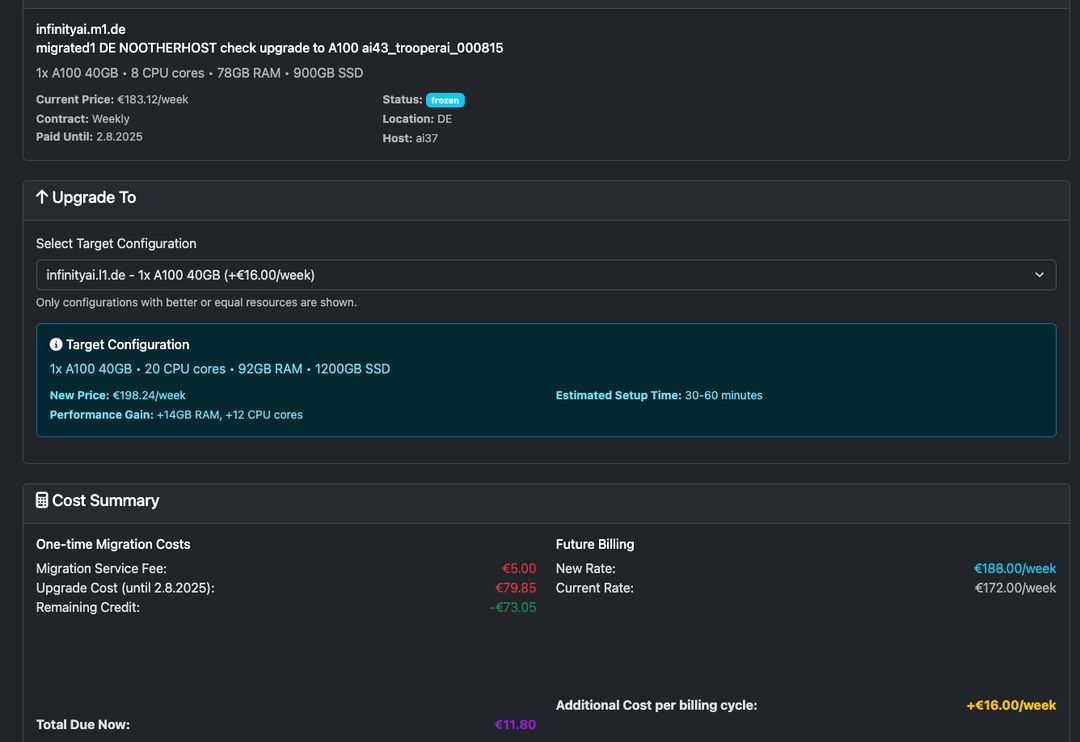
Upgrade your existing GPU Server to a more powerful configuration is a great thing on Trooper.AI and very unique to us. This gives you the ability to seamlessly transition to more powerful hardware without losing your existing setup or data.
During migration, your server will be temporarily frozen. You’ll only see configurations with better or equal resources available. A migration service fee plus addition remaining interval costs, as displayed during the process, may apply. NVMe storage capacity cannot be reduced; therefore, migrations require selecting a target configuration with equal or larger storage capacity.
Ports may change.
Just select “Migrate to better Blib” from the Actions pulldown on your server.
12. Bare Metal GPU focused Architecture
Blibs utilize a hybrid architecture, combining dedicated bare-metal resources with virtualized components:
| Hardware | Bare-Metal | Virtualized |
|---|---|---|
| GPU | ✅ | |
| CPU | ✅ | |
| RAM | ✅ | |
| NVMe Storage | ✅ | |
| Networking | ✅ |
This approach delivers 100% of the performance potential of the GPU, CPU, and RAM, while leveraging the flexibility of virtualized NVMe storage and networking for streamlined provisioning, robust backups, and enhanced security.
You also benefit from full control over NVIDIA drivers, kernel modules, and APT package handling. This makes your GPU Server Blib a reliable and scalable AI machine for daily use and production environments.