Tuning Ministral-3 on vLLM
A Practical Guide to Plain Text and JSON Responses
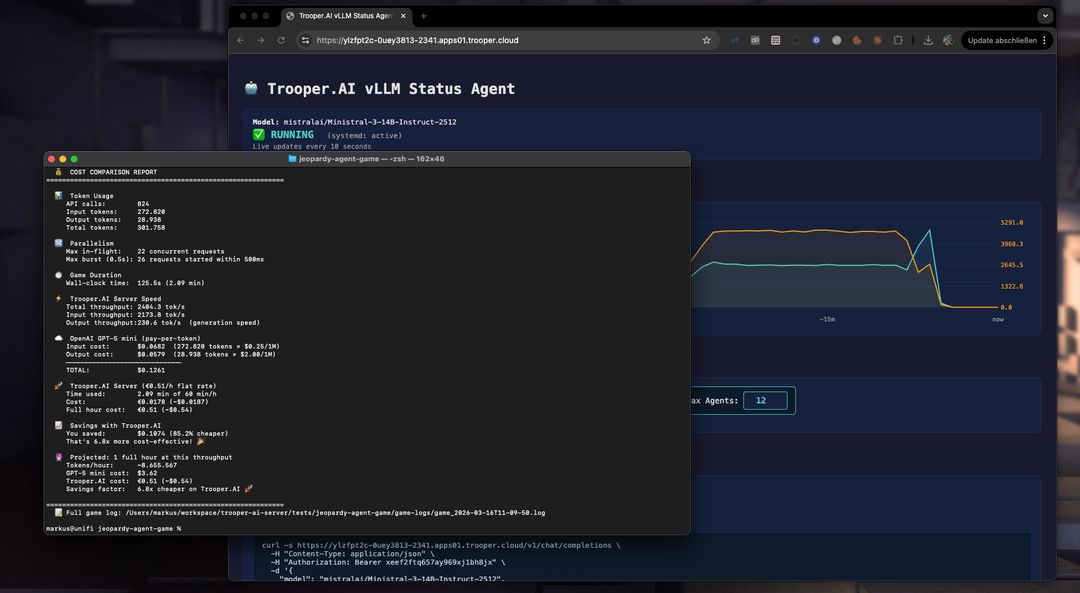
Lessons learned while building a 12-player AI Jeopardy simulation powered by Ministral-3-14B-Instruct-2512.
A Practical Guide to Plain Text and JSON Responses
Lessons learned while building a 12-player AI Jeopardy simulation powered by Ministral-3-14B-Instruct-2512.
Running Ministral-3 on vLLM is surprisingly powerful. The model is fast, creative, and capable of producing high-quality responses even under heavy workloads.
But once you move from simple chat prompts to structured outputs, automation, or programmatic use, things quickly get complicated.
During the development of an AI-driven Jeopardy game with 12 simultaneous players and hundreds of model calls, we encountered several practical issues:
This guide summarizes the practical lessons learned while solving these issues, along with concrete patterns you can reuse in your own projects.
Our benchmark project simulates a full Jeopardy game where:
A single game run can easily exceed 800 API calls.
This environment exposed edge cases that rarely appear in simple demos — making it a great test bed for understanding how Ministral behaves under real production workloads.
Ministral models do not use the standard HuggingFace tokenizer configuration.
This means the launch command must explicitly enable the Mistral tokenizer format.
vllm serve mistralai/Ministral-3-14B-Instruct-2512 \
  --tokenizer_mode mistral \
  --config_format mistral \
  --load_format mistral
If your application relies on function calling, add the tool flags:
--enable-auto-tool-choice
--tool-call-parser mistral
Unlike some other models, Ministral does not support chat_template_kwargs.
If you send a request like this:
{
  "chat_template_kwargs": {
    "enable_thinking": false
  }
}
vLLM returns:
HTTP 400: chat_template is not supported for Mistral tokenizers
That means features such as explicit “thinking mode” toggling (used with models like Qwen or DeepSeek) are simply not available.
Fortunately, this is rarely needed because Ministral already produces concise outputs by default.
The official vLLM documentation consistently uses the following value with Ministral-3:
temperature = 0.15
At first glance this seems extremely low. However, it turns out to be critical for structured tasks.
Using the OpenAI-style default:
temperature: 0.7
the model becomes overly creative with structure.
A simple request like:
{ "expertise": "2-3 topics they know best" }
may return something like:
{
  "expertise": [
    {
      "category": "Gourmet Pizza Alchemy",
      "detail": "Can transform random ingredients into Michelin-star pizza"
    },
    {
      "category": "Sumo Wrestling Physics",
      "detail": "Understands body mechanics and center-of-gravity combat"
    }
  ]
}
While technically valid JSON, it is not what the schema asked for.
The result:
max_tokens limits are exceeded0.15 works betterAt low temperature the model becomes structurally disciplined.
temperature: 0.15
Benefits:
Even creative text generation remains strong — the model simply stops improvising with structure.
Recommendation:
Use temperature: 0.15 as your default for Ministral-3.
Producing machine-readable JSON from LLMs is harder than it sounds.
Ministral tends to interpret schema fields semantically instead of structurally, which leads to deeply nested output.
A prompt like:
Return JSON with these fields.
often produces verbose structures.
Example request:
{ "expertise": "2-3 topics they know best" }
Typical response:
{
  "expertise": [
    {
      "category": "Ancient Roman Engineering",
      "detail": "Knows aqueduct systems in surprising detail"
    },
    {
      "category": "Pizza Dough Chemistry",
      "detail": "Obsessed with yeast fermentation dynamics"
    }
  ]
}
This consumes three times the expected tokens.
The most reliable solution combines two instructions.
Respond with ONLY valid JSON.
No markdown, no explanation, no text before or after the JSON.
Keep values as short plain strings — never use nested objects or arrays.
Right next to the schema definition:
Every value MUST be a short plain string — NO arrays, NO nested objects.
Combined with temperature 0.15, this produces predictable flat JSON.
Even when constrained, Ministral tends to produce longer values than other models.
Example observation from our benchmark:
| Model | Tokens needed |
|---|---|
| GPT-4o | ~512 |
| Qwen | ~512 |
| Ministral-3 | ~1024 |
A safe rule:
Budget 1.5–2× the tokens for JSON outputs.
Even with perfect prompts, models occasionally generate malformed JSON.
A good strategy is to add defensive parsing layers.
function extractJSON(raw, shape) {
  var text = raw.replace(/^```(?:json)?\s*/i, '').replace(/\s*```$/i, '').trim();
  if (shape === 'array') {
    var m = text.match(/\[[\s\S]*\]/);
    if (m) text = m[0];
  } else {
    var m = text.match(/\{[\s\S]*\}/);
    if (m) text = m[0];
  }
  return text;
}
Track open brackets and close them automatically:
var stack = [];
var inStr = false, esc = false;

for (var i = 0; i < text.length; i++) {
  var ch = text[i];

  if (esc) { esc = false; continue; }
  if (ch === '\\') { esc = true; continue; }
  if (ch === '"') { inStr = !inStr; continue; }
  if (inStr) continue;

  if (ch === '{') stack.push('}');
  else if (ch === '[') stack.push(']');
  else if (ch === '}' || ch === ']') stack.pop();
}

text = text.replace(/,\s*$/, '');

while (stack.length > 0)
  text += stack.pop();
If the model still returns nested structures:
if (Array.isArray(value)) {
  flat = value.map(function(item) {
    if (typeof item === 'string') return item;
    if (typeof item === 'object') return Object.values(item).join(' — ');
    return String(item);
  }).join(', ');
}
A simple retry loop dramatically increases reliability.
Because Ministral behaves consistently at low temperature, retries usually succeed.
Recommended:
2–3 retry attempts
Ministral loves formatting.
Even when you ask for plain text, it tends to produce:
This happens because the model ships with a built-in system prompt encouraging rich markdown formatting.
Many pipelines rely on simple string checks.
Example:
verdict.toUpperCase().startsWith('CORRECT')
But if the model returns:
**CORRECT**
the check fails.
The safest approach is to normalize all outputs before processing.
function stripMarkdown(text) {
  if (!text) return text;

  var s = text.replace(/\*\*([^*]+)\*\*/g, '$1');
  s = s.replace(/__([^_]+)__/g, '$1');
  s = s.replace(/\*([^*]+)\*/g, '$1');
  s = s.replace(/^#{1,6}\s+/gm, '');
  s = s.replace(/`([^`]+)`/g, '$1');
  s = s.replace(/^```[a-z]*\s*$/gm, '');

  return s.trim();
}
Apply this to every model response, not just Ministral.
It avoids model-specific branching and keeps pipelines consistent.
If your system supports multiple model families (Mistral, Qwen, DeepSeek, Llama, etc.), the most maintainable design is to centralize model behavior in one place.
Example:
function buildModelProfile(modelName) {
  var lower = modelName.toLowerCase();
  var isMistral = lower.includes('mistral') || lower.includes('ministral');

  return {
    family: isMistral ? 'Mistral' : 'Generic',

    jsonSystemInstruction: isMistral
      ? 'Respond with ONLY valid JSON. No markdown. Keep values as short plain strings.'
      : 'You output only valid JSON. No markdown fences, no explanation.',

    jsonSchemaHint: isMistral
      ? ' Every value MUST be a short plain string — NO arrays, NO nested objects.'
      : '',

    jsonTemperature: isMistral ? 0.15 : 0.7,
    defaultTemperature: isMistral ? 0.15 : 0.7,

    plainTextInstruction: ' Do not use markdown formatting.'
  };
}
This allows the rest of your system to remain model-agnostic.
Adding a new model later becomes trivial.
| Setting | Recommended Value | Reason |
|---|---|---|
| tokenizer_mode | mistral | Required for correct tokenizer |
| config_format | mistral | Required |
| load_format | mistral | Required |
| chat_template_kwargs | Do not send | Not supported |
| temperature | 0.15 | Prevents structural hallucination |
| JSON instruction | Explicit flat values | Avoid nested objects |
| max_tokens | 1.5–2× typical | Model is verbose |
| Markdown stripping | Always | Prevent formatting errors |
| JSON retries | 2–3 attempts | Reliable recovery |
Ministral-3 performs extremely well when properly tuned.
Once you:
the model becomes remarkably predictable and production-ready.
In our Jeopardy benchmark, this setup supported:
All running locally on Trooper.AI GPU infrastructure.
Try the full vLLM deployment template here: vLLM OpenAI-Compatible Server
Rent your own GPU server today and start building amazing AI applications! Trooper.AI GPU servers are built from purely upcycled high-end tech from the last years, designed to provide you with the best performance, security, and reliability for all your AI needs.
EU location · High privacy · Great performance · Best support