Server vLLM OpenAI-Compatible
Trooper.AI fornisce un modello di distribuzione completamente automatizzato vLLM che installa, configura ed esegue un server di inferenza compatibile con OpenAI sulla Sua macchina GPU utilizzando systemd.
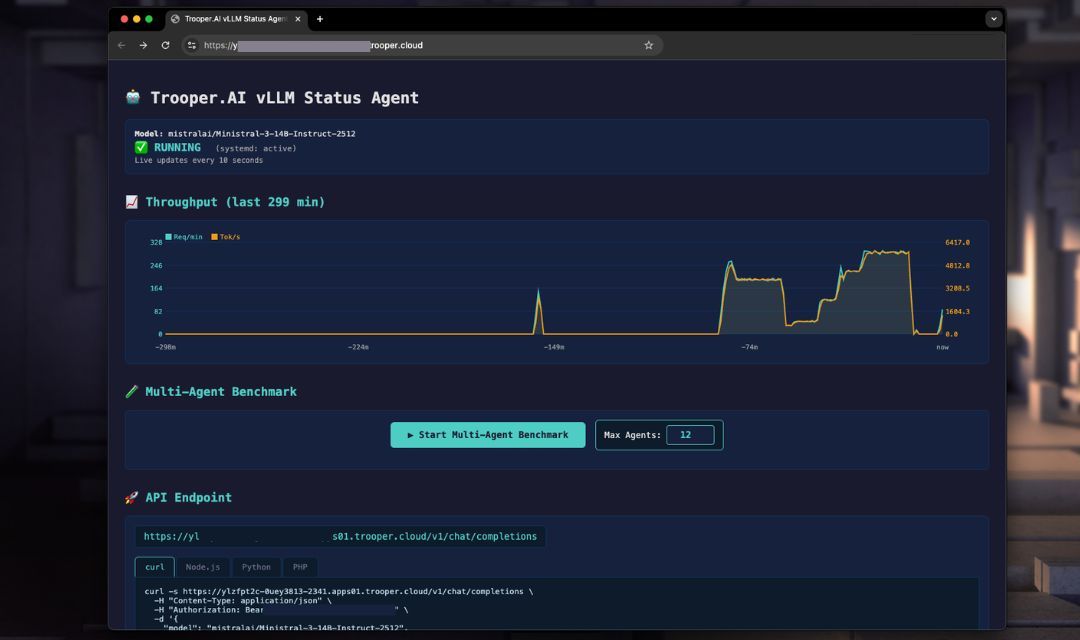
L'obiettivo:
- Massima throughput
- Regolazione automatica dell'architettura GPU
- API compatibile con OpenAI
- Impostazioni predefinite sicure per la produzione
- Nessuna regolazione manuale del GPU richiesta
Il template esegue automaticamente:
- Rileva l’architettura del GPU e la VRAM
- Seleziona la precisione ottimale (FP16 / BF16 / FP8)
- Regola la batching e la concorrenza
- Installa vLLM in un ambiente virtuale
- Crea un servizio persistente systemd
- Espone endpoint compatibili con OpenAI
- Eseguire benchmark delle prestazioni per ottimizzare i parametri
You only control a small set of public parameters.
Comprensione dei numeri di GPU: vLLM funziona con più GPU, ma richiede che il numero di GPU divida in modo uniforme le attention heads del modello. Ad esempio, un modello come Gemma con 32 attention heads può utilizzare 1, 2, 4 o 8 GPU – ma non 3.
Nota di sicurezza importante sulle schermate: I server mostrati nelle schermate sono solo a scopo dimostrativo e sono protetti dal Trooper.AI Network-Level Firewall, incluso in tutte le ordinazioni di GPU Server. Per informazioni dettagliate, vedere 🛡️ Trooper.AI Firewall personalizzabile a livello di rete.
Settings of vLLM template
Questo modello distribuisce un server di inferenza vLLM pronto all'uso sulla Sua istanza Trooper.AI. Installa l'ambiente di esecuzione necessario, configura il punto di accesso API e prepara il modello per richieste compatibili con OpenAI.
Below is a short explanation of each configuration option.
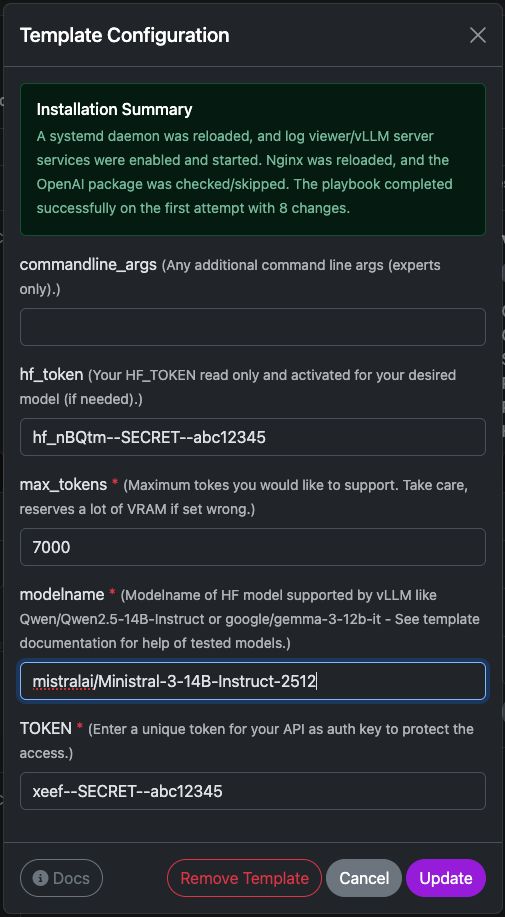
commandline_args
Argomenti avanzati opzionali passati direttamente al comando di avvio del server vLLM.
Use this if you need to enable additional features such as:
- tensor parallelism
- quantization
- tool calling
- custom tokenizer settings
- speculative decoding
Example:
--tensor-parallel-size 2
Leave empty unless you know exactly which flags you want to use.
hf_token
Il Suo token di accesso a HuggingFace.
This is required if the model:
- è gated
- richiede autenticazione
- o viene scaricato da un repository privato
For public models this field can be left empty.
You can generate a token here:
https://huggingface.co/settings/tokens
The token is only used during model download.
max_tokens
Definisce la finestra di contesto massima che il server deve supportare.
Questo influisce direttamente sull'utilizzo della VRAM.
Typical values:
| Context | Recommended |
|---|---|
| small models | 4096 |
| medium models | 8192 |
| long context models | 16384+ |
Higher values increase memory usage significantly. If your server runs out of VRAM, lower this value.
modelname
L’identificatore del modello HuggingFace che vLLM deve caricare.
Example:
mistralai/Ministral-3-14B-Instruct-2512
Other compatible examples:
Qwen/Qwen2.5-14B-Instruct
google/gemma-3-12b-it
meta-llama/Meta-Llama-3-8B-Instruct
... and many more
Make sure the model is supported by vLLM and fits into your GPU memory.
TOKEN
Questo è la Sua chiave di autenticazione dell'API.
All requests to the vLLM server must include this token in the header:
Authorization: Bearer YOUR_TOKEN
This protects your server from unauthorized access.
Example request:
curl https://your-server/v1/chat/completions \
  -H "Authorization: Bearer YOUR_TOKEN"
Use a strong random string.
Model Size & GPU Requirements
You can utilize a wide range of large language models from HuggingFace within vLLM. Ensure sufficient VRAM is available, as performance is contingent upon having adequate free GPU VRAM to accommodate the model and context size, multiplied by the number of concurrent users.
Trooper.AI automatically selects optimal precision per GPU architecture.
Calcolo della VRAM: Peso del modello + ~25% buffer di cache KV.
VRAM può essere condivisa tra più GPU tramite Tensor Parallelism (--tensor-parallel-size N).
| Modello | Parameters | Precision | Min. VRAM Total | GPU Configuration | GPUs |
|---|---|---|---|---|---|
| Qwen/Qwen3-4B | 4B | BF16 | ~8 GB | 1× V100 16GB / RTX 4070 Ti Super | 1 |
| Qwen/Qwen3-8B | 8B | BF16 | ~20 GB | 1× RTX 3090 / RTX 4090 (24 GB) | 1 |
| mistralai/Ministral-3-14B-Instruct-2512 | 14B | FP8 | ~29 GB | 1× RTX 4080 Pro 32GB or 1× A100 40GB | 1 |
| Qwen/Qwen3-32B | 32B | FP8 | ~40 GB | 1× A100 40GB or 2× RTX 4090 (2×24 GB) | 1–2 |
| meta-llama/Llama-3.1-8B-Instruct | 8B | FP8 | ~20 GB | 1× RTX 3090 / RTX 4090 (24 GB) | 1 |
| meta-llama/Llama-3.1-70B-Instruct | 70B | FP8 | ~90 GB | 1× RTX Pro 6000 Blackwell (96 GB) or 2× A100 (2×40 GB) | 1–2 |
Nota: FP8 viene utilizzato sulle architetture Ada/Hopper (RTX 40-series, A100, H100) per il massimo throughput. \
Trooper.AI seleziona automaticamente la precisione ottimale per la Sua GPU.
Le configurazioni Multi-GPU utilizzano Tensor Parallelism — la VRAM scala linearmente tra le GPU.
Public Parameters
These parameters can be set via environment variables before running the installer.
| Variable | Descrizione |
|---|---|
TOKEN |
API key for authentication |
modelname |
HuggingFace model path |
hf_token |
HuggingFace token (for gated models) |
commandline_args |
Optional extra vLLM CLI arguments |
Automatic Benchmarking to tune Parameters
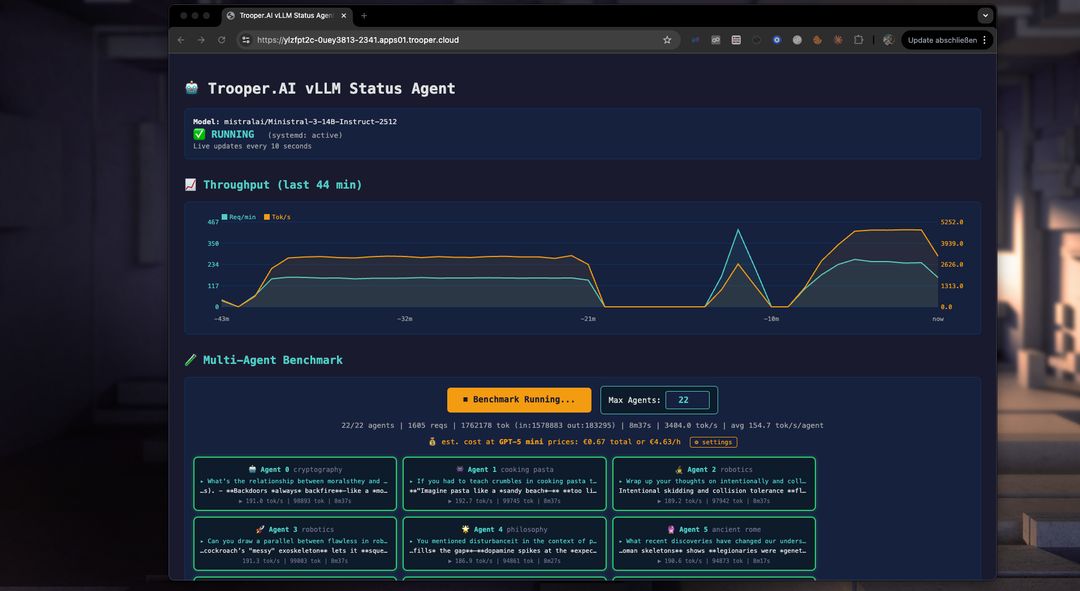
Our template includes a performance benchmark to help you optimize your GPU server for multi-agent use. Use it to test and compare models, GPU types, and parameters to maximize throughput and concurrent users.
Come funziona il benchmark?
The benchmark starts multiple agents simultaneously, each interacting with the vLLM server endpoint on a different topic. This prevents caching and tests real-world performance. You can see the throughput of each agent, the total throughput, and compare costs for tokenized services like GPT-5 mini. Often, a vLLM server from Trooper.AI is 2-4x cheaper than large token-based inference services while keeping your LLM work private!
What the Template Does
-
Detects GPU architecture (Volta, Ampere, Ada, Hopper, Blackwell)
-
Detects VRAM size
-
Selects optimal precision automatically:
- FP8 > BF16 > FP16
-
Uses FP16 KV cache for stability
-
Tunes:
- max concurrent sequences
- batched token size
- memory utilization
-
Installs vLLM with CUDA
Crea un servizio systemd:
Codicevllm-server.service-
Starts a persistent OpenAI-compatible API server on a secure HTTPS endpoint.
No manual tuning is required.
API Endpoints
Base URL:
http://YOUR_SERVER:PORT/v1
Endpoints:
/v1/models/v1/completions/v1/chat/completions
Authentication header:
Authorization: Bearer YOUR_TOKEN_FROM_CONFIG
Python Client Example
from openai import OpenAI

client = OpenAI(
    api_key="YOUR_API_KEY",
    base_url="https://YOUR_SERVER_ENDPOINT.apps.trooper.ai/v1"
)

resp = client.chat.completions.create(
    model="Qwen/Qwen3-14B",
    messages=[
        {"role": "user", "content": "Hello, what is vLLM?"}
    ],
    max_tokens=200
)

print(resp.choices[0].message.content)
Node.js Client Example
import OpenAI from "openai";

const client = new OpenAI({
  apiKey: "YOUR_API_KEY",
  baseURL: "https://YOUR_SERVER_ENDPOINT.apps.trooper.ai/v1"
});

const completion = await client.chat.completions.create({
  model: "Qwen/Qwen3-14B",
  messages: [
    { role: "user", content: "Hello from Node.js" }
  ],
  max_tokens: 200
});

console.log(completion.choices[0].message.content);
PHP Client Example
<?php

$ch = curl_init("https://YOUR_SERVER_ENDPOINT.apps.trooper.ai/v1/chat/completions");

$data = [
  "model" => "Qwen/Qwen3-14B",
  "messages" => [
    ["role" => "user", "content" => "Hello from PHP"]
  ],
  "max_tokens" => 200
];

curl_setopt_array($ch, [
  CURLOPT_POST => true,
  CURLOPT_RETURNTRANSFER => true,
  CURLOPT_HTTPHEADER => [
    "Authorization: Bearer YOUR_API_KEY",
    "Content-Type: application/json"
  ],
  CURLOPT_POSTFIELDS => json_encode($data)
]);

$response = curl_exec($ch);
curl_close($ch);

echo $response;
Streaming Example
Python Streaming
resp = client.chat.completions.create(
    model="Qwen/Qwen3-14B",
    messages=[{"role":"user","content":"Explain transformers"}],
    stream=True
)

for chunk in resp:
    if chunk.choices[0].delta.content:
        print(chunk.choices[0].delta.content, end="", flush=True)
Node.js Streaming
const stream = await client.chat.completions.create({
  model: "Qwen/Qwen3-14B",
  messages: [{ role: "user", content: "Explain transformers" }],
  stream: true
});

for await (const chunk of stream) {
  process.stdout.write(chunk.choices[0].delta?.content || "");
}
Casi d’uso
Trooper.AI vLLM servers are designed for:
- SaaS AI backends
- Chatbots
- Code assistants
- RAG systems
- Multi-user inference servers
- High throughput batch inference
- GPU rental environments
Performance Philosophy
Trooper.AI uses:
- Automatic architecture tuning
- Automatic precision selection
- VRAM-aware batching
- Stable KV cache configuration
This avoids:
- GPU misconfiguration
- Precision crashes
- VRAM fragmentation
- Context instability
Cost Comparison: Ministral-3 on Trooper.AI vs GPT-5 mini
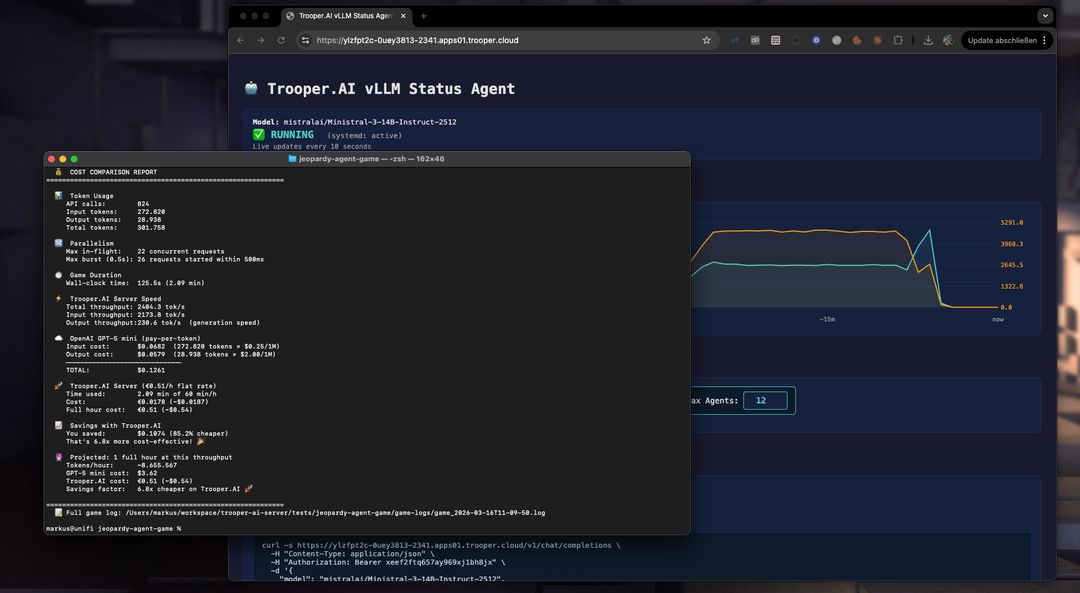
To give a rough idea of the economics of self-hosting, the following comparison projects the cost of running Ministral-3-14B-Instruct-2512 on a Trooper.AI GPU server versus using the GPT-5 mini API for the same workload.
The estimate is based on the real benchmark run described in this article and extrapolated to one hour of continuous inference throughput.
Hourly Cost at Measured Throughput
| Platform | Hourly cost |
|---|---|
| GPT-5 mini API | ~$3.12 |
| Ministral-3-14B su Trooper.AI GPU server | €0.51 (~$0.54) |
How this was calculated
Questa stima si basa sull’esecuzione reale del benchmark riportata in questo articolo utilizzando Ministral-3-14B-Instruct-2512 su un server GPU di Trooper.AI.
| Metric | Valore |
|---|---|
| Total tokens processed | 307,028 |
| Runtime | 153 seconds |
| Throughput | ~2006 tokens/sec |
| Projected tokens/hour | ~7.22M tokens |
Token mix in the benchmark:
| Token type | Tokens |
|---|---|
| Input tokens | 275,186 |
| Output tokens | 31,842 |
Scalando questo rapporto a ~7,22 milioni di tokens/ora e applicando GPT-5 mini pricing:
- $0.25 / 1M input tokens
- $2.00 / 1M output tokens
si traduce in una stima di ~$3.12 all'ora per lo stesso carico di lavoro.
Il server Ministral-3 su Trooper.AI invece funziona a un costo fisso di €0.51/ora (~$0.54), indipendentemente dal volume di token, il che consente di elaborare milioni di token all'ora a costo prevedibile.
Long-Running Workload Projection
Utilizzando il throughput osservato, è possibile stimare il costo di esecuzione del sistema per un'intera ora.
| Metric | Valore |
|---|---|
| Tokens per hour | ~7,221,543 |
| GPT-5 mini cost | $3.12 |
| Trooper.AI server cost | €0.51 (~$0.54) |
Hourly savings
Running the same workload for an hour would still be:
≈ 5,8 volte più economico su Trooper.AI
When Self-Hosting Becomes Much Cheaper
Self-hosting LLMs tends to win economically when:
- i carichi di lavoro contengono molte richieste piccole
- inferenza parallela è richiesta
- applicazioni generano milioni di token all'ora
- i carichi di lavoro vengono eseguiti ininterrottamente
Typical examples include:
- AI game simulations
- agent systems
- automation pipelines
- chat applications with many users
Summary
In this benchmark:
| Metric | Result |
|---|---|
| Modello | Ministral-3-14B |
| Server cost | €0.51/hour |
| Tokens processed | 307k |
| Runtime | 153 seconds |
| Cost reduction | 82.8% |
| Cost advantage | 5,8 volte più economico di GPT-5 mini |
Per workload ad alto throughput, l’esecuzione di modelli come Ministral-3 su Trooper.AI GPU servers può ridurre drasticamente i costi di inferenza eliminando contemporaneamente i limiti delle API.
Why you need the vLLM template
The Trooper.AI vLLM template gives you:
- API compatibile con OpenAI
- Automatic GPU optimization
- Impostazioni predefinite sicure per la produzione
- Minimal configuration
- Massima throughput
You only choose the model and API key.
Everything else is optimized automatically.
Troubleshooting
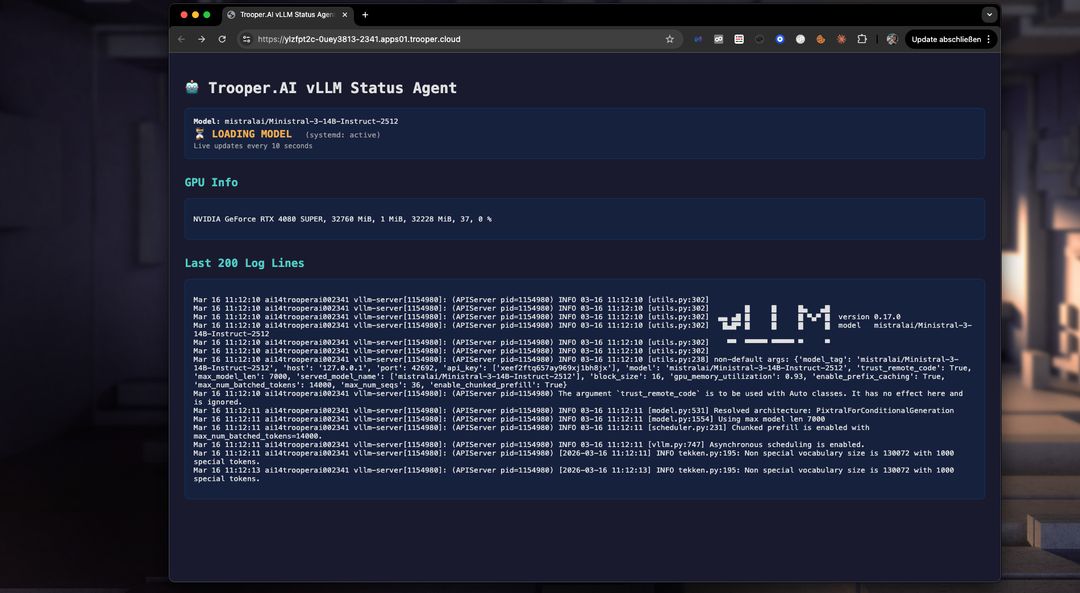
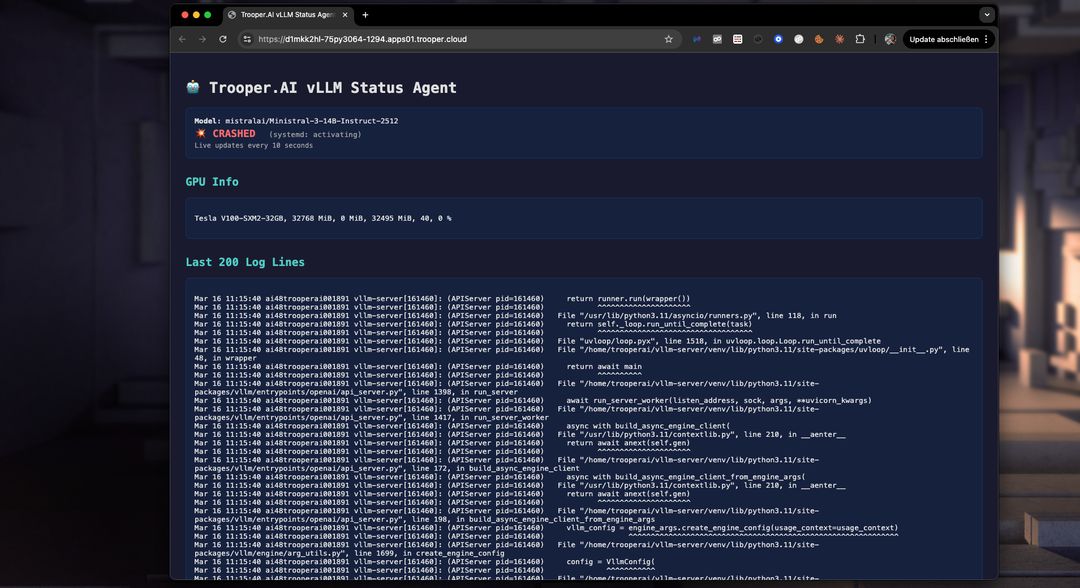
With the dashboard you can easily detect issues in startup and fix them. Not enougth VRAM? Upgrade to a higher Blib in minutes via the dashboard. Or fix the VRAM usage by lowering the token window size. Check the Logs easily in realtime with the dashboard:
Ministral 3
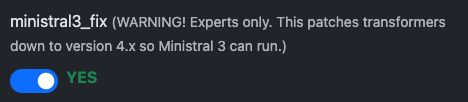
To use Ministral 3 you need normally Transformers 4.x and this can be easily forced with the “Ministral 3 Fix” checkbox in the Template configuration. Please note, vLLM is a expert tool and you need to know how to optimize and fix issues, but we help as good as possible.
First, activate Ministral 3 Fix:
Second, use these aprameters to get most features out of the model:
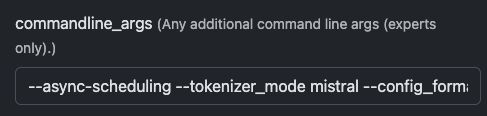
--async-scheduling --tokenizer_mode mistral --config_format mistral --load_format mistral --enable-auto-tool-choice --tool-call-parser mistral --limit-mm-per-prompt='{"image":{"count":4,"width":768,"height":768}}'
This will then Startup Ministral 3 on your Server - if all other parameters fitting your VRAM size.
Nemotron 3 Nano with Token Budget
Per NVIDIA Nemotron 3 Nano è necessario almeno la versione 0.18.1 di vLLM (nightly al 30-03-2025). Può configurare il parser e il limite dei token in modo da utilizzare thinking_token_budget. Legga di più qui: https://docs.vllm.ai/en/latest/features/reasoning_outputs/#online-serving
Attenzione: ciò ridurrà il throughput di circa il -30%!
Modify command_line_args to something like this:
  --async-scheduling
  --reasoning-parser-plugin /home/trooperai/vllm-server/nano_v3_reasoning_parser.py
  --reasoning-parser nano_v3
  --reasoning-config '{"think_start_str": "<think>", "think_end_str": " - I have to give the solution based on the thinking directly now:</think>"}'
Download parser from:
wget -O - https://huggingface.co/nvidia/NVIDIA-Nemotron-3-Nano-30B-A3B-BF16/resolve/main/nano_v3_reasoning_parser.py
Alternatively you can use the nemotron_3_parser set to ON. This will do this for you. Make sure also activate nightly developer build!
This way you get more control over reasoning feature of Nemotron 3 Nano.
Assistenza
For advanced tuning, multi-GPU, or custom presets, contact Trooper.AI support.