Web Proxy with SSL
Securing your connection to your GPU server is a key consideration for every developer. Ensuring your work is accessible while maintaining security is important as you develop the next big AI thing! Before proceeding make sure also reading 🌍 HTTPS Access (How to access your Blib via SSL) and 🛡️ Trooper.AI customizable Network-Level Firewall.
👮 For optimal security and scalability, do not expose this endpoint directly to public users. Implement a dedicated web server to manage user interactions, which will then communicate with your GPU server. This architecture adheres to best practices and industry standards.
You can install multiple Web Proxy SSL instances on the same GPU Blib. Each instance runs independently and can forward to a different internal service or port.
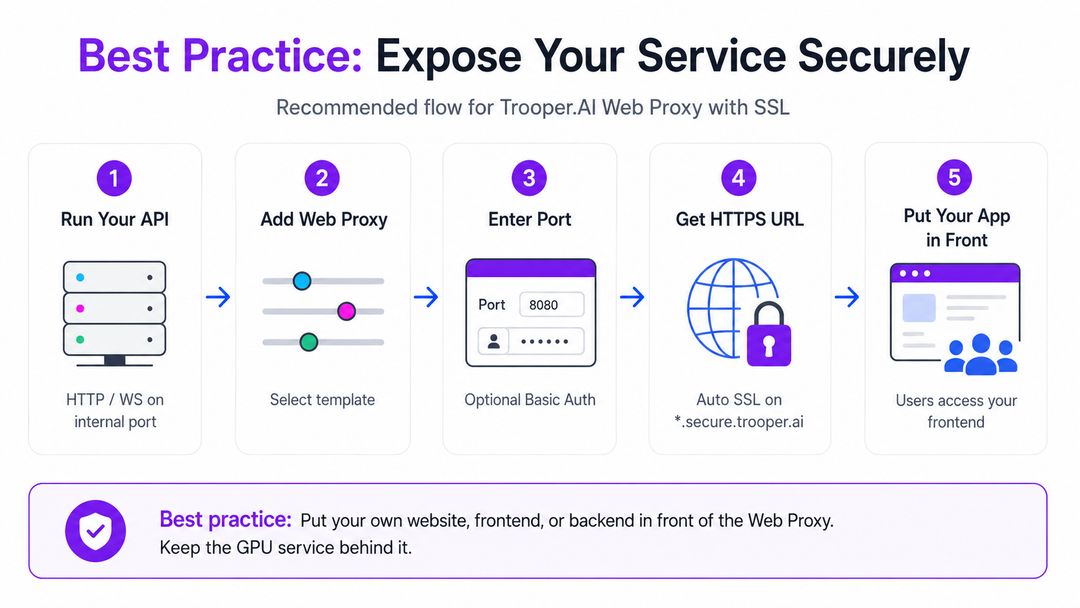
Simple, Secure Exposure of an Internal Service to the Internet
This template provides a lightweight way for clients to expose an internal service (HTTP or WebSocket) to the public internet through the Trooper.AI router system. It automatically creates a secure HTTPS endpoint with a free SSL certificate, while forwarding traffic to any internal port on the client’s machine.
The goal is simplicity: install a small proxy, specify the internal port, and instantly get a secure, externally reachable URL.
All traffic from the Webproxy’s SSL Endpoint to your machine’s public port is routed in our internal network, completely bypassing the internet. This is a significant security advantage of Trooper.AI.
Key Features
1. Public HTTPS Endpoint
Your internal service becomes available under a *.secure.trooper.ai subdomain, routed through the Trooper.AI infrastructure with automatic SSL certificates.
2. Full WebSocket Support
The template forwards both standard HTTP traffic and WebSocket connections without additional configuration.
3. Optional Password Protection
If a username and password are provided, the endpoint is secured with Basic Auth. Leaving both values empty disables authentication.
4. Clean and Minimal Setup
Each installed instance of SSL Web Proxy creates a dedicated proxy endpoint, listens on an automatically assigned external port, and forwards traffic to the configured internal service.
How It Works
Inputs
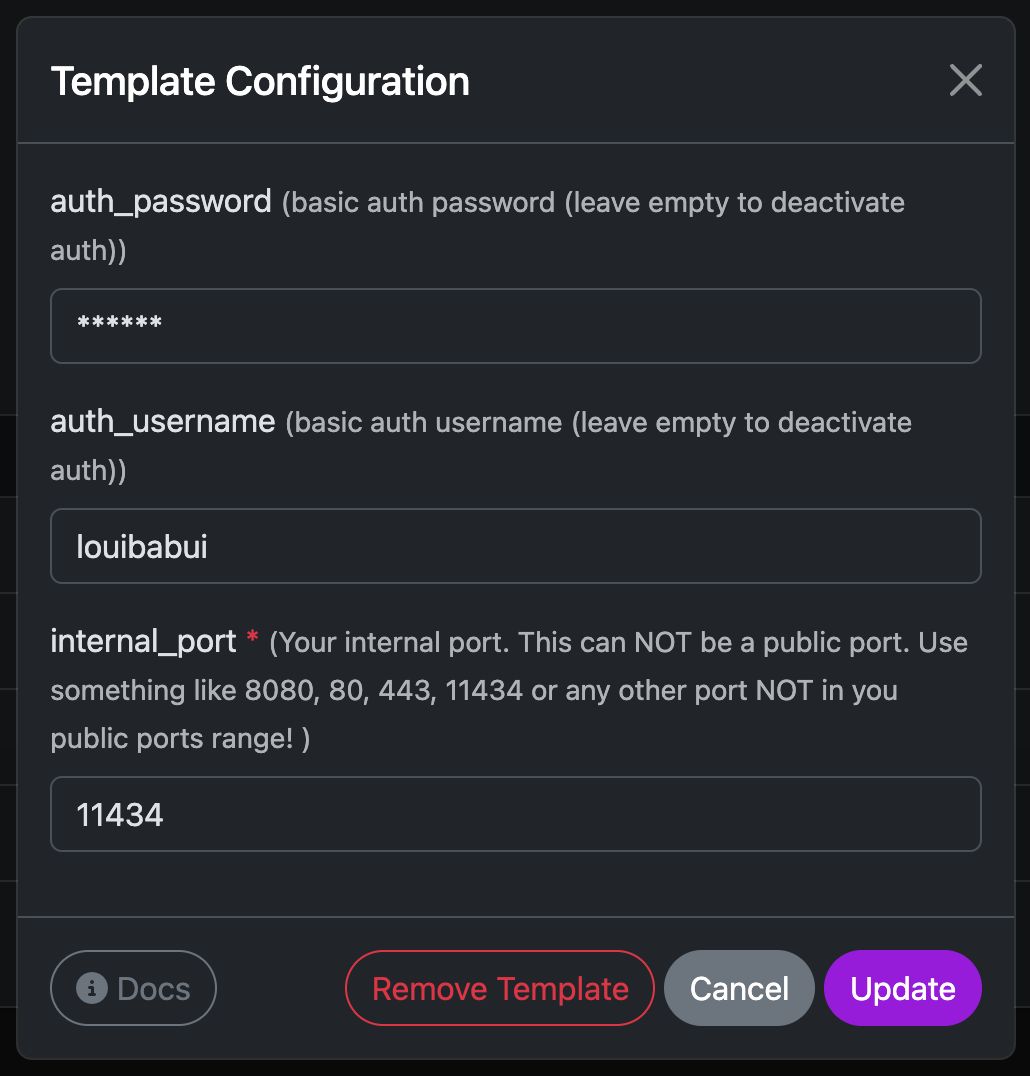
You only set template configuration before installation.
The external port will be assigned automatically and displayed next to the template name, just like with other templates.
🚨 Do not use port 443 and don’t provide a self sign certificate on your port!
Internal Flow
- Nginx is installed (including htpasswd support).
- If authentication is enabled, a password file is created.
- A proxy configuration is placed under
/etc/nginx/sites-available/trooperai-webproxy-<external_port> - The config forwards all incoming traffic to
http://127.0.0.1:<internal_port>. - WebSocket upgrade headers are automatically passed through.
- Nginx is reloaded and the endpoint becomes active.
Timeout classes
| Traffic type | How it’s detected | Proxy timeout |
|---|---|---|
| Regular HTTP request/response | Anything not matched below | 60s (DEFAULT) |
| Chat/Streaming (SSE / NDJSON) | Path contains /api/chat, /chat/completions, /api/generate, /generate, /stream, /events, or Accept: text/event-stream / application/x-ndjson - AND is streaming! (see below) |
10 min (LONG) |
| Large file downloads | Range header, file-like path/extension, Accept: application/octet-stream |
30 min (DOWNLOAD) |
| WebSockets | HTTP upgrade to WS/WSS | No proxy idle timeout |
The proxy also upgrades timeouts dynamically on the response (e.g., if your server sends
206orContent-Disposition: attachment, it bumps to the DOWNLOAD timeout even if the request wasn’t classified as a download initially).
⚠️ The long timeout on streaming only works if your service streams the response! Slow or non-streaming requests can still be dropped at 60s. So also make sure TTFT is below 60s and data keeps flowing.!
Free SSL Certificate included
Once active, Trooper.AI’s router detects the exposed port, issues a free SSL certificate, and publishes your secure endpoint.
Example Result
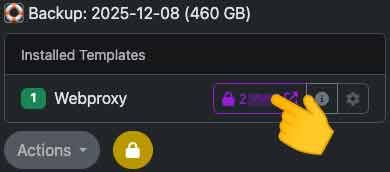
Given a Trooper.AI-assigned domain such as:
myapp123-husky-delta.secure.trooper.ai
and an automatically assigned external proxy port (e.g., 12345), with an internal service listening on port 8080,
the connection flow will be: https://myapp123-husky-delta.secure.trooper.ai -> 12345 -> 8080.
This securely forwards traffic from the public HTTPS endpoint to your internal service.
Troubleshooting
We have compiled answers to common questions regarding the webproxy feature. For individual assistance, please contact our support team: Support Contacts.
Where to find my HTTPS domain?
Ensure your internal service is running on the desired port, then install or update the corresponding Web Proxy SSL instance. Its assigned domain and SSL activation status (indicated by a lock icon) will then be displayed.
⚠️ No lock icon? The endpoint is only activated if your internal service responds to / with an HTTP status code between 200 and 499 within 1.5 seconds. A 5xx error, a refused connection, or a slower response keeps the endpoint inactive. Login-protected services returning 401/403 are detected correctly.
Does the WebProxy support UDP and WebSockets?
WebSocket is simply an HTTP(S) upgrade — fully supported by the WebProxy, enabling seamless integration with widely used AI applications featuring web interfaces.
UDP is a stateless protocol requiring no certificates; you communicate directly via hostname:port instead. Encryption is managed at the application level (e.g., LiveKit using DTLS). Since the WebProxy is HTTP-based and HTTP runs over TCP, it cannot forward UDP — but you don’t need a proxy for UDP anyway. Simply open the required UDP ports in your firewall.
Can I restricting Access to Specific IP Addresses?
Our SSL WebProxy integrates seamlessly with Trooper.AI’s built-in firewall rules. To restrict access to designated IP addresses or ranges for enhanced security, configure the respective firewall policies in the Management Dashboard.
For detailed guidance on implementing IP restrictions, refer to our documentation:🛡️ Trooper.AI customizable Network-Level Firewall
Is my internal service HTTP or HTTPS?
That’s a valid question. Internally, your service operates as a standard HTTP service on a configurable port, such as 8080. This port remains internal to your server instance. The web proxy service installed via this template handles SSL encryption, automatically provisioning and managing the SSL certificate for secure external access. Essentially, this template establishes a secure HTTPS connection between your internal port and the public internet.
Existing Nginx Configurations
This template installs and configures Nginx to route internal traffic on your GPU server. While it will not override existing configurations, managing Nginx directly on your GPU server is generally not recommended due to potential complexity. Consider whether direct Nginx management is necessary for your workflow.
Multiple Web Proxy SSL instances can run in parallel. Each instance creates its own Nginx configuration based on its assigned external port, so the individual proxy configurations remain separated.
Handling Blocked Requests and Brute-Force Protection
Our Secure SSL Proxy includes infrastructure-level protection to keep the routing layer stable and shield your service from abusive traffic. It continuously monitors connection health and traffic patterns, and temporarily throttles sources that cause repeated failures. So the proxy can tell a genuine outage from normal operation, your service should signal real problems clearly — by rejecting or closing the connection, or returning a 5xx server error when it is genuinely unavailable.
Application-level authentication (e.g. login or API-key checks returning 401/403) is handled by your own service. The proxy intentionally does not block on these, so normal auth flows are never disrupted.
Error Codes (E-Codes)
If you encounter an error page while accessing your endpoint, it will display a unique error code (e.g. e-code: TP3) in its headline. Please include this code when contacting support — it helps us pinpoint the cause immediately.
| # | Status | Meaning | What you can do |
|---|---|---|---|
| TP1 | 502 | Generic gateway error while contacting your service. | Verify your internal service is running and reload after a few moments. |
| TP2 | 403 | Request blocked by a firewall rule for your endpoint. | Check your firewall/allow-list settings for the source IP and port. |
| TP3 | 502 | Your internal service could not be reached. | Confirm the service is listening on the configured internal port. |
| TP4 | 503 | Access to your service was temporarily blocked after repeated errors. | Wait a short moment, then reload. Avoid automatic retries on the client side. |
| TP5 | 502 | Connection to your service was refused, not found, or timed out. | Ensure the service is up, reachable, and responding on the correct port. |
💡 Avoid aggressive automatic retries when you see an error page. Repeated failing requests can lead to a temporary block (TP4).